
A Mac app for Muse Code.
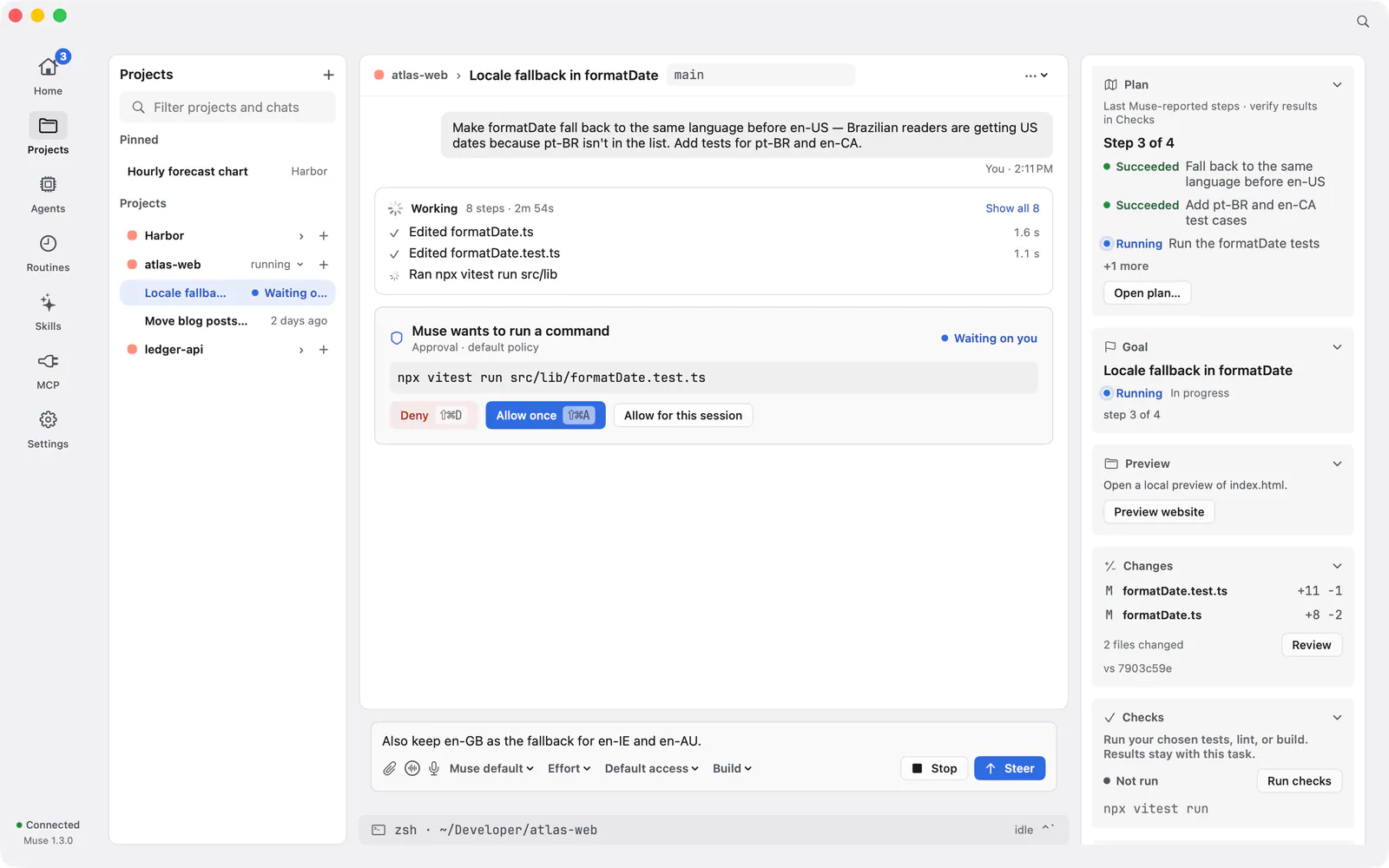
Thalia is a native Mac app for agentic coding with Meta’s Muse Code CLI. It gives the work a window of its own: projects, a chat for each task, plans you approve, commands you read in full, and diffs you review before they land.
This page describes Thalia 0.8.2.
What Thalia is
Thalia is a desktop app, not a replacement for Muse. It runs Meta’s Muse Code CLI for you and puts a Mac interface on top of it. If you searched for a Muse Code desktop app or a Muse Code GUI for Mac, this is a native one, written in Swift and SwiftUI.
Thalia is made by Mabry Ventures. It is independent and is not made or endorsed by Meta.
It uses your own Muse CLI and account
Thalia works with the Muse Code CLI installed on your Mac and your own Muse access. If the CLI is missing, Thalia’s setup installs it from Meta and checks the download first, then guides you through signing in with your Meta account or a Muse API key. A key you provide is handed to the CLI, which stores it, so Thalia does not keep your Muse credentials itself.
When you chat, your messages and the files the agent reads go through the Muse Code CLI to Meta, under your Muse account and Meta’s terms. Meta sets any Muse subscription or usage charges. Projects, chats, checkpoints and settings stay on your Mac, and the app sends the Thalia team no analytics, telemetry or usage data. Read the privacy notice.
Requirements
- A Mac with Apple Silicon (M-series). Intel Macs are not supported.
- macOS 27.
- Meta’s Muse Code CLI, signed in with your own Muse access. Setup can install the CLI and guide you through sign-in.
- For review, checkpoints and worktrees: a Git repository. For pull requests: a GitHub remote and the GitHub CLI (
gh), installed and signed in.
Thalia is free to use. Windows and Linux versions have not been announced.
What you can do in it
- Projects and chats. Open a folder as a project and start a chat for each feature or fix. Home shows approvals waiting on you, plans ready to review, failed checks and running work in one place.
- Plan mode. Switch the composer to Plan and Muse restarts read-only. Thalia shows Plan only once that has happened, and a message sent while Muse starts waits for the switch. Read the plan, then approve it to build, ask for changes or discard it.
- Approvals you can read. When Muse asks to run a command, Thalia shows the whole command, with hidden characters made visible, before Allow is available. A compound command shows the current step as Step X of N, and long commands and long network addresses must be shown in full before you allow them.
- Review you can stand behind. Review lists the changes and shows text diffs. When you approve, Thalia records that snapshot, and the approval is no longer valid if the files stop matching it. Run your project’s checks beside the diff and send review notes back to Muse.
- Checkpoints. Capture a checkpoint, and before a restore writes anything Thalia previews which files it will put back. A restore refuses to undo over newer edits. Checkpoints help you undo; they are not a backup.
- MCP connectors. Guided presets for GitHub, Linear, Cloudflare, Sentry and GitLab, plus custom connectors over streamable HTTP or as a local command. Keys you enter in Thalia are kept in the macOS Keychain.
- Voice. Talk to Thalia hands-free, or dictate into the composer without sending. Replies can be read aloud with a Mac voice, for free.
- The rest of the loop. Steer or stop a turn while it runs, see the helper agents Muse starts, keep a terminal in the project folder, and push a branch and open a pull request through the GitHub CLI.
The full list, with screenshots, is on the features page. Muse’s output can be wrong, so review changes before you rely on them and keep backups. Wondering how this compares with running Muse in a shell? Read Thalia vs. using Muse in the terminal.
Install
- Download the DMG for Apple Silicon.
- Open it and drag Thalia to Applications.
- Open Thalia and follow the setup checklist to install the Muse CLI and connect with your Meta account or API key.
Thalia can check for and install updates.
Questions
Is Thalia the same thing as Muse Code?
No. Muse Code is Meta’s coding agent and command-line tool. Thalia is a separate Mac app from Mabry Ventures that drives your installed Muse Code CLI.
Do I need a Muse account?
Yes. You need your own Muse access, and Meta sets any Muse subscription or usage charges. Thalia itself costs nothing.
Does Thalia store my Muse credentials?
No. If you use an API key, Thalia hands it to the Muse Code CLI, which stores it. Keys you enter for guided connectors in Thalia are kept in the macOS Keychain.
Which Macs does it run on?
Apple Silicon Macs running macOS 27. Intel Macs are not supported.
Can I still use Muse in the terminal?
Yes. Thalia uses the same CLI and the same Muse account, so you can use both.
Does Thalia send my code to the Thalia team?
No. Your work stays on your Mac, apart from what the Muse Code CLI sends to Meta under your account.